Train with your friends.
Add your friends and see together who lifts more, who runs more and who hasn't missed a day. It's more motivating than training alone.
- Rankings
- Strength and running
- Period
- Week or month
- Price
- Free
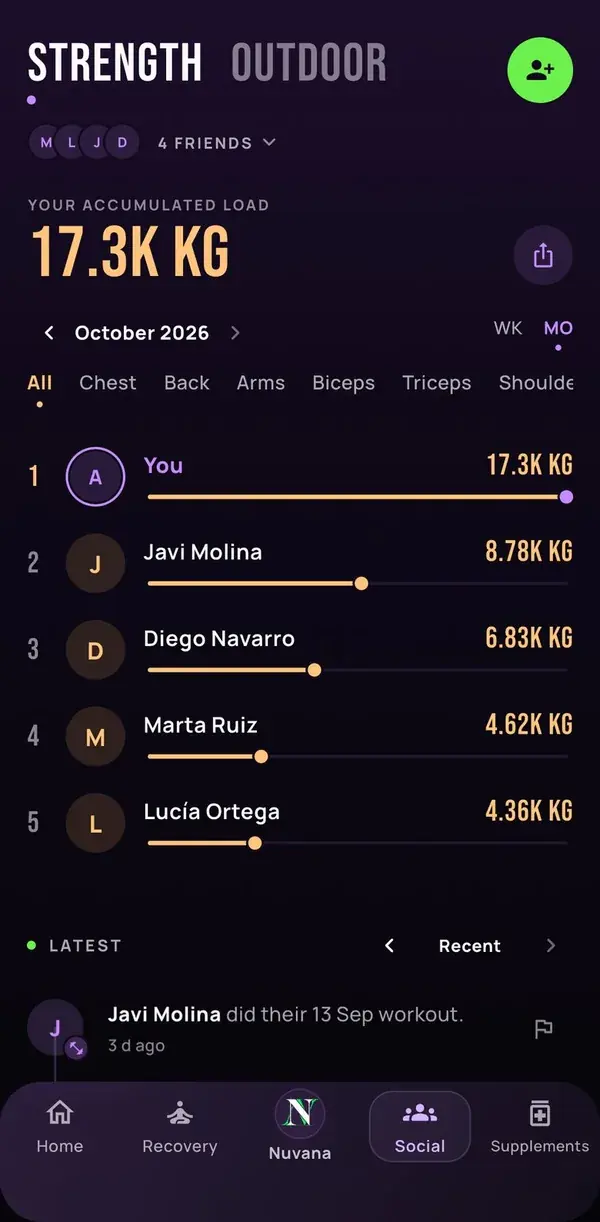
What's in Social
Social is the tab where you see your friends. Everything you log in Nuvana (workouts, records, runs and steps) counts automatically, with nothing extra to do.
- Strength ranking among friends
- Running and steps ranking
- What everyone did last
- Your social card to share
Strength ranking
Compare the total weight lifted this week or month, the heaviest lift and the exercises where each of you stands out. You can filter by exercise or by muscle.
Running ranking
With Outdoor, the ranking is sorted by runs, total kilometres, best kilometre or steps for the month.
Your friends' activity
You see when a friend finishes a workout, beats their record of the day or goes for a run, walk or ride. It's the easiest way not to fall behind.
Your social card
Pick the colours and what to show, then share it, or share the ranking, on your socials in one tap.
Privacy and safety
Only your friends see your activity, and you can stop sharing it in Settings. If someone bothers you, you can remove, block or report them.
Frequently asked questions
How do I add a friend?
In Social, tap Add friend and search for their username or Nuvana ID. Once they accept the request, they appear in your rankings.
Is it free?
Yes. Social is included in the free app.
Who sees my workouts?
Only the people you've accepted as friends. You can turn off activity sharing in Settings, under Privacy.
Invite your friends to Nuvana.
Download the app, share your ID and start competing this week.